
Plan the day. Know it works before it starts.
A visual day-board for bunk rotations, league matchups, and playoffs. Live conflict detection means nothing reaches campers with an unresolved problem.
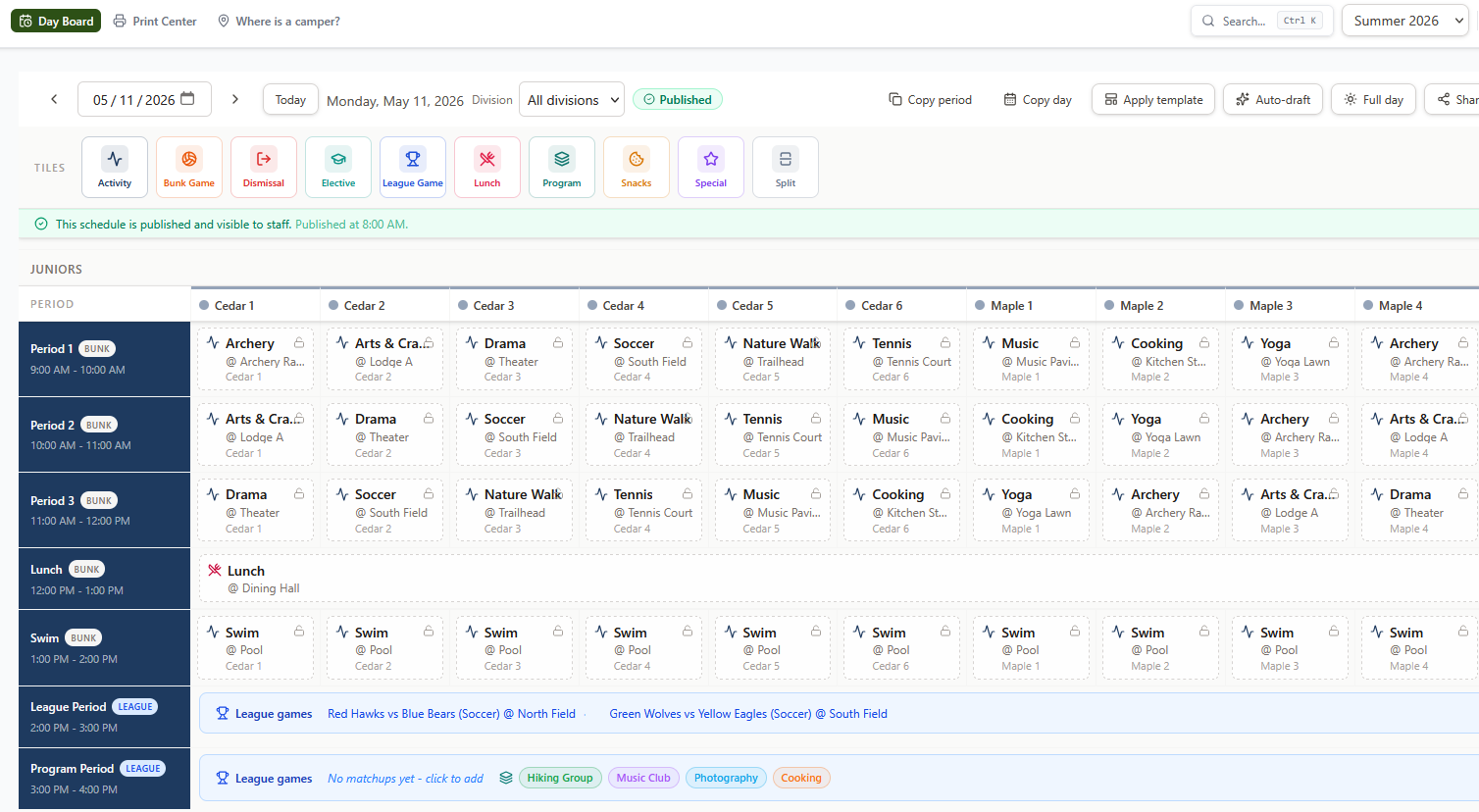
Plan the whole day on one grid
A visual period-by-group canvas where every bunk and team's day is visible at once. Drag an activity onto a cell and the schedule updates immediately.
Period-by-group grid
Each row is a time period; each column is a bunk or league team. Fill cells by dragging activity chips from the palette onto the grid. The full day stays visible as you build it.
Division view
The day-board splits into one grid per division so directors with many bunks can focus on one group without scrolling past the others. Divisions with no assignments for the day are hidden automatically.
10 tile types cover the full day
Activity, elective, league game, bunk game, special event, split period, lunch, snacks, dismissal, and custom pinned: every slot in the camp day has a tile type so the grid reflects reality, not just activity assignments.
Split periods
When a group does two things in one period, assign a split tile. Both halves are tracked, validated, and published together. No workaround needed.
Elective sign-ups
Mark activities as elective-eligible and campers sign up for their preferred choice. Elective periods sit in the same grid as the rest of the day, no separate tool needed.
Bunk-vs-bunk games
Schedule an informal game between any two bunks directly on the day-board without creating a league. Drop a bunk game tile, pick the opposing bunk, activity, and location. Results are recorded in place after the game.
Rotations, matchups, and playoffs in the same day
Each period is independently bunk mode or league mode. Bunk periods assign activities to groups; league periods schedule team matchups and playoff brackets at locations.
Bunk-mode periods
Bunk columns rotate through activity cells independently. Each bunk gets the right activity for the right period. Overbooking a location or activity capacity flags immediately.
League-mode periods
Switch a period to league mode and it renders as a matchup block across all columns. Assign team vs. team at a location. Multiple leagues can run in disjoint periods on the same day.
Playoffs and brackets
Run a single-elimination playoff after the regular season. The league board shows a live bracket tree; matchups auto-populate from standings and can be scheduled to a period and location the same way as regular-season games. Results advance the bracket automatically.
Catch conflicts, then get the schedule out
Live validation runs on every edit. Hard violations block publish; soft violations flag suboptimal assignments. Once it's right, share it with staff or parents in one click.
Live conflict detection
Capacity violations, double-booked locations, and eligibility mismatches flag in real time as you build the schedule, not after you try to publish.
Hard and soft violations
Hard violations (red) block publish. Soft violations (amber) flag suboptimal assignments but don't block. The distinction is intentional: soft warnings inform without stopping the day.
Lock and publish
When the day looks right, publish it. Individual assignments can be locked to protect manual edits from being overwritten. Locked-but-invalid assignments render distinctly so they're never silently ignored.
Copy days and templates
Copy any day's schedule to another day, or save it as a template for the week. Templates apply the pattern across any date range: build once, repeat all summer.
Publish to the day
Published schedules are visible to counselors and staff. Unpublished changes stay in draft until you're ready. Every publish is audit-logged.
Shareable day-board
Directors can share a published day board as a tokenized link that anyone can open without logging in. The link shows the published schedule for that date and expires automatically at end of day.
Print Center
Export the published day in three layouts: Master Schedule (full division grid), Individual Bunks (per-bunk list), and per-camper schedules. Download any of them as CSV, Excel, or PDF. The print layout is camp-branded with page breaks between sections.
Ready to see Campday in action?
No pitch. Just a 20-minute walkthrough of your camp's setup.